
Why It’s Time to Switch from POP3 to IMAP for Your Email
If you haven’t already…
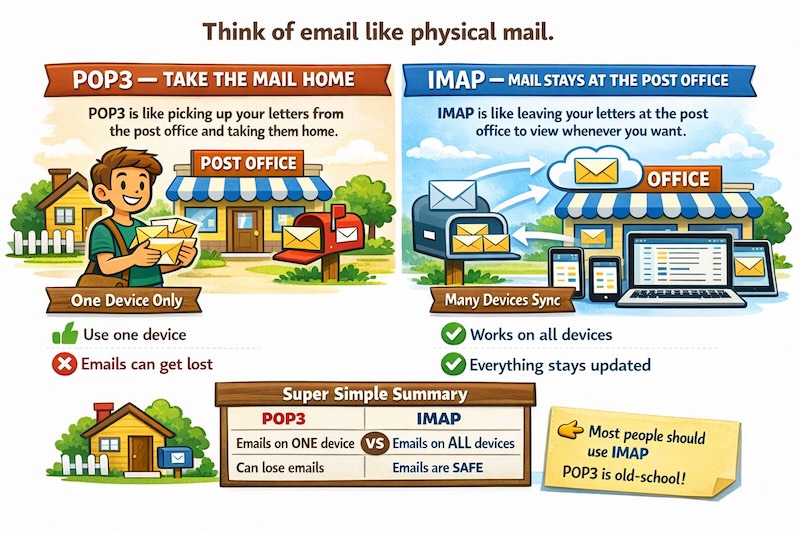
If you’ve been using email for a while, there’s a good chance your account is still set up using something called POP3. It’s been the standard way of collecting email for decades, and it works perfectly well if you only ever check your messages from one computer. But the way we use email has changed rather a lot since the 1990s.
These days, you might check your email on your laptop at home, your phone whilst you’re out, and perhaps a tablet in the evening. With POP3, this becomes a bit of a nightmare. Messages you’ve read on your phone don’t show as read on your computer. Emails you’ve replied to on your laptop appear as unread on your tablet. And if you delete something on one device, it’s still sitting there on all the others.
This is where IMAP comes in, and switching to it can make your email experience considerably less frustrating.
What’s the difference?
Think of POP3 like collecting your post from the post office. You go there, pick up all your letters, take them home, and they’re no longer at the post office. If you want to read them again, you need to find them amongst all your papers at home.
IMAP is more like having a filing cabinet at the post office itself. Your letters stay there, neatly organised, and you can look at them whenever you want, from wherever you are. You can make notes on them, file them into folders, and those changes are visible whether you’re looking at the cabinet in person or checking what’s in it from home.
The practical benefits
The main advantage is that everything stays in sync. Read an email on your phone during your morning coffee, and when you check your computer later, it’s already marked as read. Delete something you don’t need, and it disappears from all your devices. File an important message into a folder, and that folder appears everywhere.
This also means your emails are safely stored on your email provider’s servers rather than just sitting on your computer’s hard drive. If your laptop breaks or gets stolen, you haven’t lost years of correspondence. You can simply log in on a new device and everything’s still there.
For those who like to keep their inbox tidy, IMAP makes this much easier. Any folders you create are accessible from all your devices, so you can organise your messages once and have that organisation everywhere. The same goes for sent items and drafts – they’re all synchronised automatically.
Is it difficult to switch?
Not particularly. Most email providers now recommend IMAP as standard, and many modern email programs will set it up automatically when you add an account. If you’re using a smartphone or tablet, IMAP is almost certainly what you’re already using on those devices.
The switch itself usually involves updating your email program’s settings. Your email provider should have straightforward instructions for this, or their support team can walk you through it. The process typically takes about ten minutes, and you won’t lose any of your existing emails.
The one thing to be aware of is that if you’ve got years of messages stored on your computer using POP3, you’ll want to make sure those are uploaded to the server before you switch entirely. Again, your email provider can advise on the best way to do this for your particular situation.
Is there any reason not to switch?
The only real disadvantage is that IMAP requires a bit more storage space on your email provider’s servers, since all your messages stay there rather than being downloaded and deleted. However, most email accounts these days come with plenty of storage. At The Very Good Email Company, for instance, we provide 50GB of storage with our accounts – that’s enough space for hundreds of thousands of emails, including attachments. Even if you’re a prolific correspondent who never deletes anything, you’d struggle to fill that up.
Some people prefer POP3 because they like having their emails stored locally on their own computer rather than “in the cloud.” That’s a valid choice, though it’s worth noting that you can configure IMAP to keep local copies as well, giving you the best of both worlds.
Making the move
If you’re still using POP3, it’s worth having a conversation with your email provider about switching to IMAP. It won’t revolutionise your life, but it will make checking email across multiple devices considerably less irritating. And given how much time many of us spend dealing with email, that’s a quality of life improvement worth having.
The modern world expects us to be connected from anywhere, on any device. IMAP simply makes that possible without the headache of manually keeping everything in sync.
It’s one of those quiet improvements in technology that you don’t really appreciate until you’ve experienced it – and then you wonder how you ever managed without it…
We’ve put together a guide to help you make the transition.