
Email Authentication Explained
Your Invisible Shields Against Spam and Scams
Every day, billions of fake emails flood the internet. Some pretend to be from your bank. Others claim to be from trusted companies like Amazon or PayPal. Many appear to come from people you actually know – colleagues, friends, or business partners.
How do email systems know which messages are genuine and which are fraudulent?
The answer lies in three invisible security systems working behind the scenes: SPF, DKIM, and DMARC.
If you’ve ever wondered why some of your legitimate emails end up in spam folders, or how scammers manage to send emails that look like they’re from real companies, understanding these three technologies will give you the answers.
Don’t worry—we’ll skip the technical jargon and explain everything in plain English.
The Problem: Anyone Can Fake a Return Address
Here’s the uncomfortable truth about email: it’s a bit like traditional post. When you send a letter, you write your return address on the envelope. But there’s nothing stopping you from writing *any* address you want. You could write “10 Downing Street” as your return address even though you live in a flat in Manchester.
Email works the same way. When someone sends an email, they can type any “From” address they like. Scammers exploit this every single day:
– Fake emails appearing to come from your bank asking you to “verify your account”
– Bogus invoices that look like they’re from suppliers you actually use
– Phishing attempts pretending to be from your CEO asking for urgent wire transfers
– Spam messages claiming to be from well-known companies
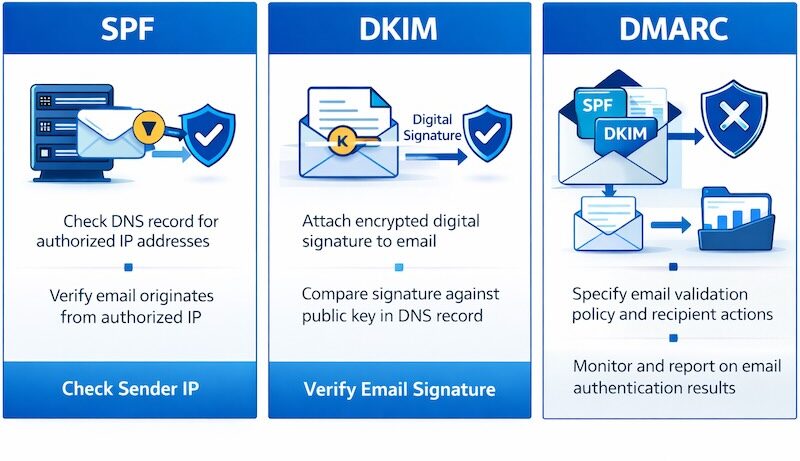
This is where SPF, DKIM, and DMARC come in. Think of them as the email equivalent of security features on banknotes—ways to prove that a message really came from who it claims to be from.
SPF: The Approved Sender List
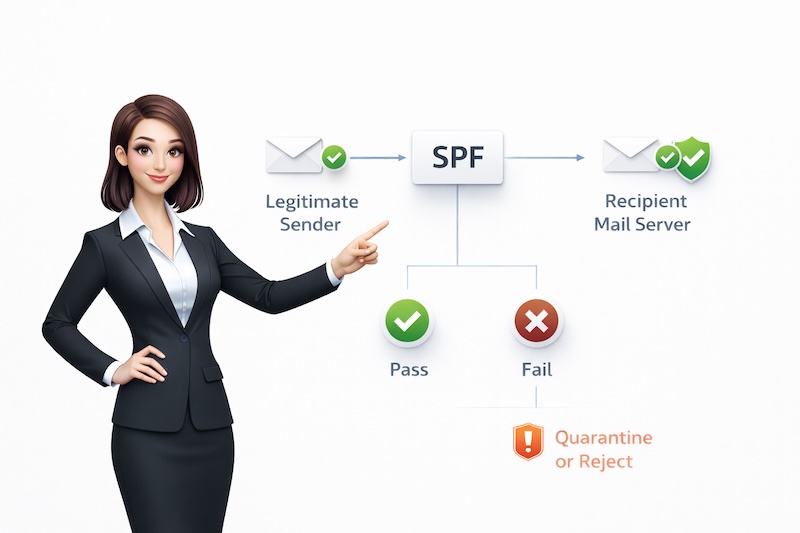
SPF stands for “Sender Policy Framework,” but let’s call it what it really is: your approved sender list.
How It Works (The Simple Version)
Imagine you run a business and you’re concerned about people impersonating your company in emails. You create a list of all the computers and mail servers that are allowed to send email on your behalf. This list gets published in a special place (your domain’s DNS records) where other email servers can check it.
When someone receives an email claiming to be from you, their email server asks: “Is this email coming from one of the approved senders on the list?”
– If yes: “This looks legitimate. I’ll accept it.”
– If no: “This isn’t from an approved sender. This might be spam or a scam.”
A Real-World Example
Let’s say you work for “WidgetCompany.com.” Your company’s IT team has set up SPF to say: “Only emails sent from our office mail server and our marketing email service (MailChimp, for example) are legitimate emails from WidgetCompany.com.”
Now, when a scammer tries to send fake emails pretending to be from WidgetCompany.com using their own dodgy mail server, the recipient’s email system checks the SPF record and thinks: “Hang on, this email claims to be from WidgetCompany.com, but it’s not coming from any of the approved servers. This looks suspicious.”
What This Means for You
As a business sending emails:
– Your legitimate emails are less likely to be marked as spam
– Your domain name is protected from being used by scammers
– Your customers and clients can trust emails from you
As someone receiving emails:
– Email systems can better filter out fake messages pretending to be from companies you know
– You’re less likely to be fooled by phishing attempts
– Spam filters work more effectively
DKIM: The Tamper-Proof Seal
DKIM stands for “DomainKeys Identified Mail,” but think of it as a tamper-proof seal—like the security stickers on a new phone or medication packaging.**
How It Works (The Simple Version)
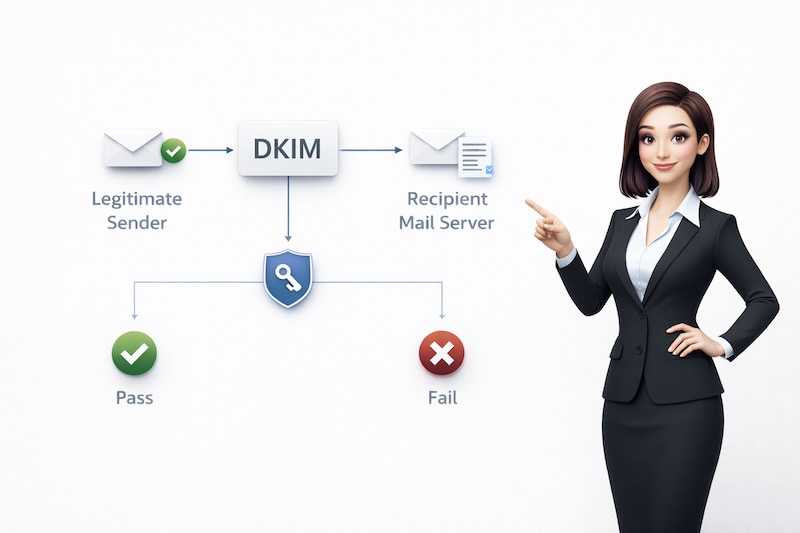
When a legitimate company sends you an email, DKIM adds an invisible digital signature to the message. This signature is created using complex mathematics (encryption) that proves two things:
1. The email genuinely came from who it claims to be from
2. The message hasn’t been altered during transit
When you receive the email, your email system can check this signature. If the signature is valid, you know the message is authentic and un-tampered. If the signature is broken or missing, something’s not right.
A Real-World Example
Think of DKIM like a wax seal on a historical letter. In the old days, important people would press their signet ring into hot wax on an envelope. If the seal arrived intact, you knew:
– The letter really came from that person (they had the unique ring)
– Nobody had opened the letter in transit (the seal was unbroken)
DKIM does the same thing digitally. When your bank sends you an email:
– They add their unique digital “signature” to the message
– If anyone tries to modify the email during delivery (changing account numbers, adding malicious links), the signature breaks
– Your email system can verify the signature is valid and the message hasn’t been tampered with
What This Means for You
As a business sending emails:
– Your emails carry proof they really came from you
– Recipients can trust your messages haven’t been modified by hackers
– Email providers (like Gmail and Outlook) trust your messages more
As someone receiving emails:
– You have additional protection against emails that have been modified by criminals
– Your email provider can better distinguish real messages from sophisticated fakes
– Even if a scammer compromises a mail server, they can’t forge the DKIM signature
DMARC: The Enforcement Officer
DMARC stands for “Domain-based Message Authentication, Reporting, and Conformance,” but let’s call it what it does: the enforcement officer.
SPF and DKIM are excellent security measures, but they need one more component—instructions about what to do when emails fail these checks. That’s where DMARC comes in.
How It Works (The Simple Version)
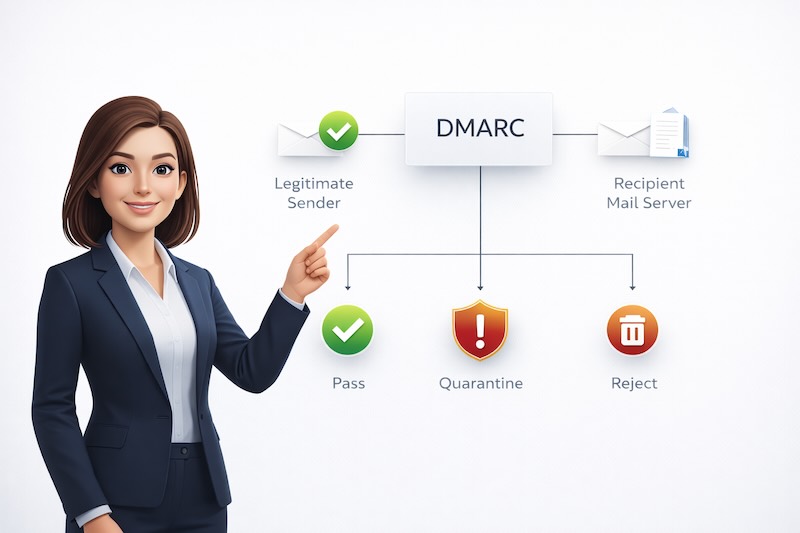
DMARC is like setting up house rules. It lets you tell other email systems:
1. “Please check both SPF and DKIM on emails claiming to be from my domain”
2. “Here’s what I want you to do if an email fails these checks” (quarantine it, reject it, or let it through but monitor it)
3. “Please send me reports about emails failing these checks so I can see who’s trying to impersonate me”
A Real-World Example
Imagine you’re the CFO of a company, and you’re fed up with scammers sending fake payment requests pretending to be from your finance team.
You implement DMARC with a strict policy that says: “Any email claiming to be from our finance department must pass both SPF and DKIM checks. If it fails, reject it completely.”
Now when scammers try to send fake invoices pretending to be from your company:
– The email fails SPF (it’s not from your approved servers)
– The email fails DKIM (it doesn’t have your authentic digital signature)
– DMARC says “reject this completely”
– The fake email never reaches the recipient’s inbox
Meanwhile, you receive regular reports showing how many fake emails were blocked, helping you understand the scale of attempted fraud against your company.
What This Means for You
As a business sending emails:
– You control what happens to emails that fail authentication
– You receive visibility into impersonation attempts
– Major email providers (Gmail, Microsoft, Yahoo) give preference to domains with DMARC
– You can gradually roll out protection (starting with monitoring, then quarantine, then reject)
As someone receiving emails:
– Your email provider has clear instructions on how to handle suspicious emails
– Fewer fake emails reach your inbox
– You’re better protected from sophisticated phishing attacks
– Companies with strong DMARC policies are fighting to protect you
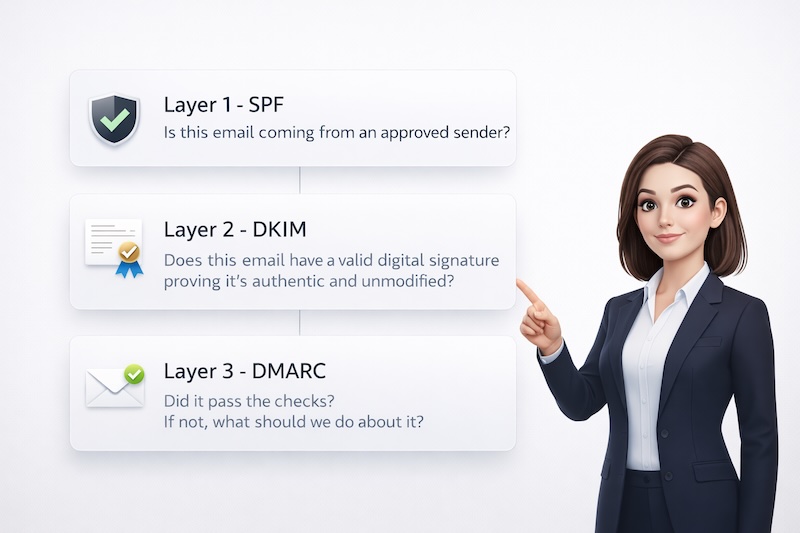
How They Work Together: The Three-Layer Defence
Think of email authentication as a three-layer security system.
Together, they create a robust defence system:
SPF stops scammers from sending emails that pretend to be from your company’s domain
DKIM stops emails from being tampered with and adds cryptographic proof of authenticity
DMARC enforces the rules and gives you visibility into what’s happening
Real-World Impact: Why This Matters
Protection from Phishing
According to recent studies, over 90% of cyber attacks start with a phishing email. These three technologies make phishing exponentially harder:
– Scammers can’t easily pretend to be from trusted companies
– Even if they compromise a system, they can’t forge DKIM signatures
– DMARC ensures failed authentication attempts are dealt with appropriately
Better Email Deliverability
If you send legitimate business emails, SPF, DKIM, and DMARC dramatically improve your deliverability:
– Major email providers (Gmail, Microsoft, Yahoo) now require these for bulk senders
– Your emails are less likely to be marked as spam
– You build a positive sending reputation
Brand Protection
When scammers send fake emails pretending to be from your company, they damage your brand reputation. These technologies help protect your good name by making impersonation much harder.
Common Questions
Q: Will this stop all spam and phishing emails?
A: No single technology stops everything, but SPF, DKIM, and DMARC significantly reduce fraudulent emails. They’re particularly effective against emails that impersonate legitimate companies.
Q: I’m a small business. Do I really need this?
A: Absolutely. Small businesses are frequent targets for email-based fraud. Plus, major email providers are increasingly requiring these technologies. Without them, your legitimate emails may not reach your customers.
The Bottom Line
SPF, DKIM, and DMARC aren’t just technical acronyms – they’re essential protections in the modern email landscape. They work together to:
– Verify emails are genuinely from who they claim to be from
– Protect against tampering and modification
– Give email providers clear instructions on handling suspicious messages
– Reduce spam and phishing in your inbox
– Ensure your legitimate emails reach their destination
Think of them as invisible bodyguards for your email – working 24/7 to protect both the emails you send and the emails you receive.
Ready for Properly Configured Email Authentication?